In today’s competitive business landscape, customers expect speed, clarity, and autonomy in how they access support. According to industry research, as many as 73% of customers want to solve product or service issues on their own, and 90% expect brands to offer self‑service support options before they reach out to an agent. Self‑service support not only improves customer satisfaction, but also reduces the load on your support team by allowing customers to find answers instantly.
A crucial component of building an effective self‑service ecosystem is a robust knowledge base – and this is where Zendesk Guide shines. From creating rich articles to leveraging automation and knowledge capture tools, Guide equips support teams with everything needed to deliver seamless self‑service experiences. In this article, we’ll walk through what Zendesk Guide is, how it works, why it matters, and how features like zendesk translation and contextual help enhance its value for global companies.
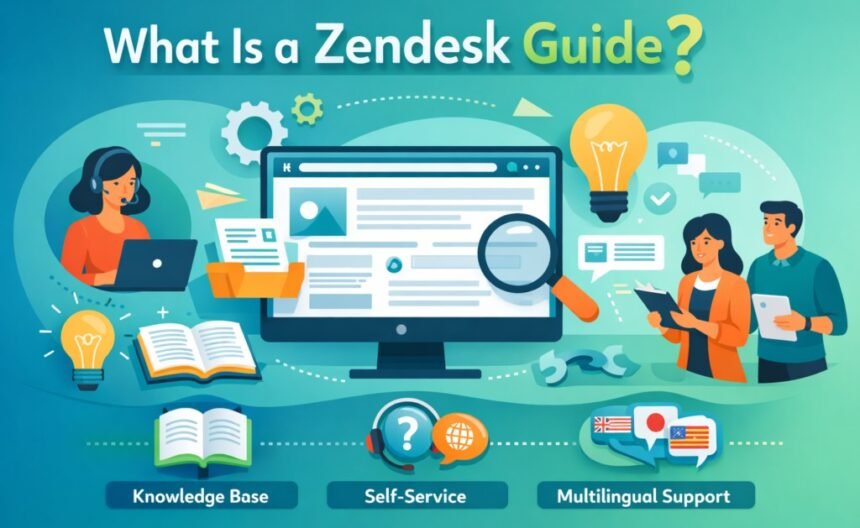
What Is a Zendesk Guide?
Zendesk Guide is a smart knowledge base platform that integrates natively with Zendesk Support, allowing businesses to capture, organize, and deliver self‑service content. Unlike a static FAQ page or a simple help document, Guide is dynamic: it evolves with your customers’ needs and adapts to the support patterns your team sees every day.
Guide is built around three core principles:
- Build a quality knowledge base
- Improve agent efficiency
- Optimize self‑service capabilities
Let’s explore these goals in detail.
Building a Quality Knowledge Base
Strong knowledge base content is the foundation of successful self‑service. But building a quality repository of content requires more than just dumping tips and FAQs into a page – it requires strategic organization, clear language, and visibility.
Why Self‑Service Matters
Customers often seek answers outside of business hours or want to avoid waiting in queues. A self‑service portal gives them that freedom and reduces the friction associated with traditional ticketing systems. Smart knowledge base content also puts contextual help right where it’s most needed. For example:
- Users can find solutions directly from menus or widgets embedded in your product interface.
- A well‑tagged article shows up in search results not only in your help center, but also in external search engines, increasing visibility and driving down inbound ticket volume.
According to Gartner, contextual delivery of knowledge can significantly reduce answer times and empower customers to help themselves.
Gathering and Organizing Content
To start building your knowledge base:
- Repurpose existing content from internal wikis, old help documents, and curated FAQs.
- Mine support trends to find common questions. For example, one‑touch tickets – tickets resolved with a single agent reply – are a goldmine for topics to convert into knowledge articles.
- Use macros and automated responses to identify frequently repeated answers and turn them into searchable content.
Once you have a body of content, organize it into sections and categories that mirror your customers’ logical search patterns.
Improving Agent Efficiency
Zendesk Guide doesn’t just help customers – it also empowers support agents.
Make Knowledge Easy for Agents
Agents are a reservoir of domain expertise, but this expertise often goes undocumented. The Knowledge Capture app within Guide allows agents to:
- Create reusable content in the moment as they solve tickets
- Access internal articles during support interactions
- Flag outdated or incorrect articles for improvement
This means that agents don’t have to remember every detail – they can surface answers instantly and consistently. Over time, this leads to a cumulative library of actionable, searchable articles that both agents and customers can use.
Agent‑Only Knowledge Bases
Guide can also create private agent knowledge bases. These are internal hubs where staff can quickly look up solutions, procedures, and institutional know‑how. This is especially valuable for onboarding new hires and ensuring consistency of service quality across the team.
Optimizing Self‑Service Capabilities
A knowledge base only works if customers can find the answers they need. Guide includes tools to ensure visibility, relevance, and continuous improvement.
Search and Analytics
Zendesk Guide provides multiple dashboards that show how your help center is performing:
- Knowledge Base Dashboard: Number of articles, views, and popularity.
- Community Dashboard: Engagement statistics, frequent questions, and collaborative responses.
- Search Dashboard: Exact search queries entered by users, highlighting gaps where content might be missing.
These analytics help you understand user behavior and refine your content strategy accordingly.
Contextual Help and AI‑Powered Suggestions
Guide can serve up relevant content contextually inside your product or help widget. If a user is stuck on a particular feature, the widget can suggest specific support articles based on that context, without the user needing to search manually. This reduces frustration and accelerates resolution.
Zendesk’s Answer Bot, powered by AI, also suggests relevant articles based on a customer’s query, often deflecting tickets before they are submitted. This intelligent routing of content frees up agents to focus on the most complex issues and enhances the customer experience.
Making Guide Work Globally: Multilingual Support & zendesk translation
Self‑service is global by nature. Customers around the world expect support content in their native language, not just English. A multilingual help center can significantly increase customer satisfaction and reduce support overhead.
Zendesk Guide supports multilanguage help centers, where you can:
- Add multiple languages to your help center
- Serve content in localized versions via subdomains or localized URLs
- Let users switch languages manually or detect language preferences automatically based on browser settings.
Where zendesk translation Fits In
To truly support global users, many companies implement zendesk translation workflows that go beyond simple language selection:
- Manual translation of knowledge base articles
- Integration with translation platforms like Crowdin or Lokalise for automated workflows
- Third‑party apps that automate article and ticket translation (often using machine translation engines or human‑reviewed workflows)
Guide’s built‑in translation panel allows editors to create localized versions of articles and ensures that translated content is correctly tagged and discoverable.
Live Conversation Translation
Beyond static articles, Zendesk has capabilities to support real‑time translation of conversations in the Agent Workspace. Agents can translate incoming and outgoing messages for live chats, emails, or social tickets without leaving their interface. This helps teams serve customers who speak other languages without needing a fully multilingual staff.
This combination of multilingual help centers and real‑time translation tools ensures your knowledge base and live support remain accessible and valuable to a global audience.
Best Practices for Knowledge Base Success
Building knowledge isn’t a one‑time task – it’s an ongoing process. To make your Zendesk Guide instance truly effective, consider the following best practices:
Keep Content Clear and Concise
Effective help content is:
- Short and easy to scan
- Written in simple language with minimal jargon
- Supported by visuals, videos, or diagrams where appropriate
Customers appreciate straightforward guidance that solves their problem without unnecessary complexity.
Use Search‑Friendly Tags
Tagging helps both your internal analytics and search engines find and display relevant articles. Good tagging increases the visibility of your knowledge base in external search results, helping drive organic self‑service discovery.
Monitor Gaps with Search Analytics
Regularly review the search dashboard to find queries that return no results or that often lead to tickets. These are prime opportunities for new articles.
Listen to Customer Feedback
Zendesk includes voting and feedback features that allow users to rate articles. High‑quality content gets positive votes – low‑rated content signals that improvements are needed.
Refresh Content Periodically
Product features change, processes evolve, and customers’ needs shift. Set content review cycles (e.g., quarterly) to ensure articles stay relevant and accurate.
Measuring the Impact of Your Knowledge Base
You can track how your knowledge base contributes to support outcomes by watching these key indicators:
- Article views and popularity
- Deflection rates (how often answers remove the need for ticket submissions)
- Customer satisfaction with articles
- Trend changes in incoming ticket types
- Reduction in repetitive support requests
Numerous companies report dramatic improvements in support efficiency and customer satisfaction after adopting and optimizing Guide.
Conclusion
Zendesk Guide is more than a help center – it’s a dynamic engine for empowering customers, capturing organizational knowledge, and enhancing support team productivity. From intelligent article creation and agent‑friendly tools to multilingual support and zendesk translation workflows, Guide provides the tools modern support teams need to scale self‑service globally.
Whether you’re just starting with Guide or looking to optimize your knowledge base for international audiences, the core principles remain the same:
- Build rich, quality content
- Make that content easy to find and use
- Enable your support team with tools that reduce repetitive tasks
- Use insights to refine and grow your self‑service capability
In a world where customers expect instantly accessible help, guiding your audience to the answers they need – in the language they prefer – can be a game‑changer for your support organization.